Concepts & Features
Library choice
libpdf is based on pdfplumber which uses pdfminer as underlying PDF reader.
libpdf uses the best parts of both libraries to do its work. Here is a feature matrix:
Features/Properties |
pdfminer |
pdfplumber |
|---|---|---|
X |
||
X |
||
X |
||
X (in sync with PDF standard) |
||
X (float) |
(Decimal) |
|
Page cropping (element extraction from bounding boxes) |
X |
Text layout analysis
pdfplumber does not expose all low-level pdfminer content to its API. Link annotations and
text layout detection are missing for example.
The layout detection of pdfminer however does a decent job. As pdfminer is installed anyway and available
through the pdfplumber API, libpdf runs the pdfminer layout detection.
However a slight post-processing is needed to fix remaining problems (like nested or empty text boxes).
Todo
is the post-processing still done?
pdfminer features a hierarchical layout structure.
The blue boxes in below diagram are used by libpdf for the text layout
analysis.
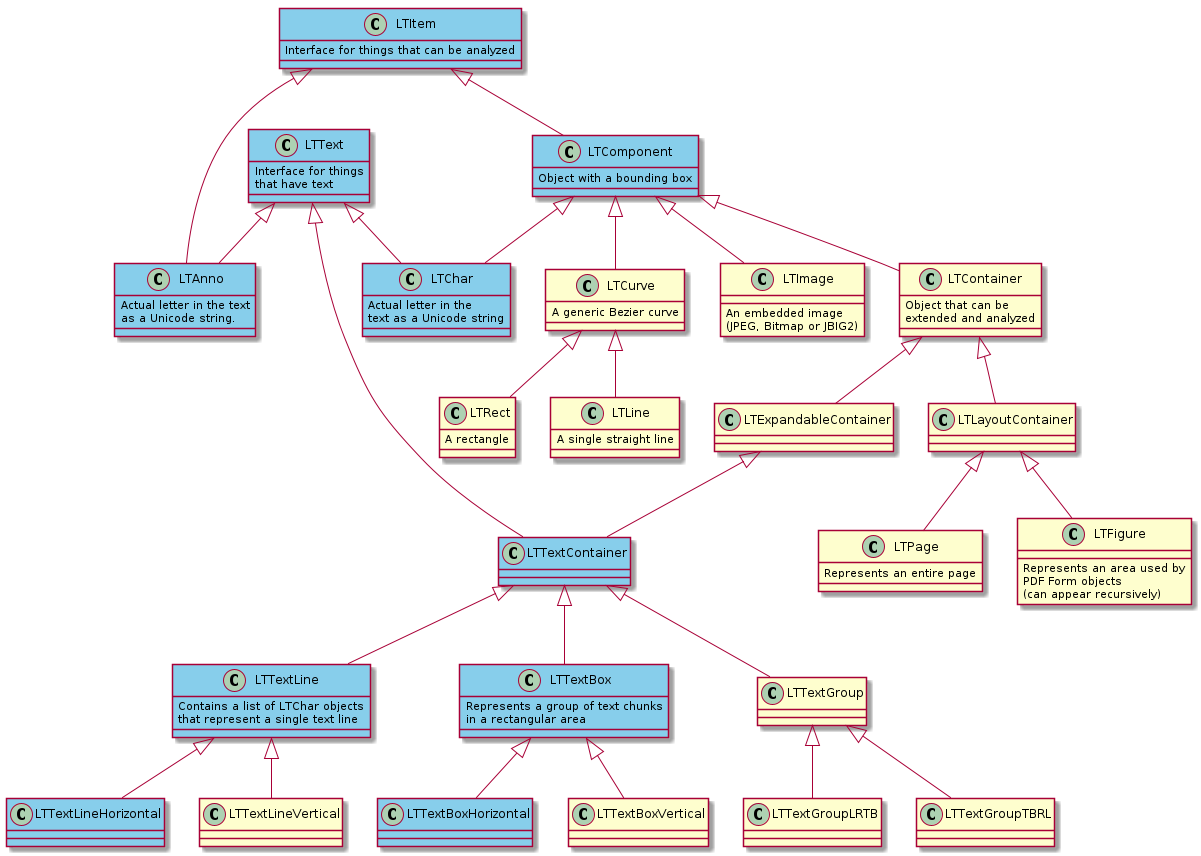
The most relevant items in above diagrams are LTTextBoxHorizontal, LTTextLine, LTChar and LTAnno.
LTChar are characters in the original PDF while LTAnno are injected by pdfminer to represent detected word
boundaries (spaces). See the
pdfminer layout documentation
for further information.
Vertical text is not supported. This might come in future.
It’s often helpful to see how libpdf analyzes the text layout. The awesome Visual Debugging features of
pdfplumber are also available in libpdf.
Bounding box definition
An issue during libpdf development was the differing bounding box definition of pdfminer and pdfplumber.
See here for the discussion on the pdfplumber issue tracker.
libpdf decided to stick with the PDF standard definition which is also used by pdfminer.
For further details see the Position class in the API docs.
Like pdfminer, libpdf uses the float data type to store bounding box coordinates.
Extraction sequence
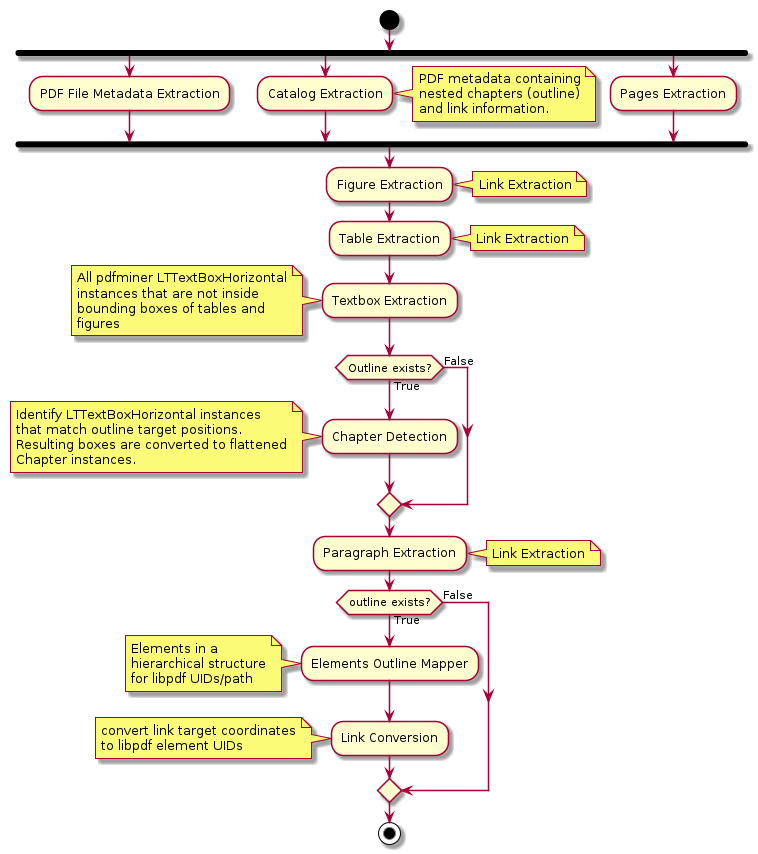
libpdf does not only extract plain text from PDFs. It executes a series of actions to convert the content
of the PDF document to a structured information for users. The overview of libpdf algorithm is shown in the diagram
below.
Todo
Link conversion should also be done if there is no outline
Catalog Extraction
Catalog is a term defined in the
PDF spec.
It contains metadata, links and structure information of a PDF.
The chapter structure commonly seen in PDF viewers is called outline within the PDF standard.
It stores target positions, that is a page number and x/y coordinates for a jump target.
This implies PDF does not know if the jump target is a figure, a table or a text/paragraph. It is just a coordinate.
libpdf tries to map jump targets to libpdf Element instances by searching for
the closest matching Textbox/Figure/Table. Links within PDF documents are called
‘Link Annotations’ and they behave identical, they define positional jump targets. Any link in a PDF (outline or
annotation) can directly link to a target (explicit) or point to a so called named destination (implicit). The
named destination is a catalog element that contains the jump target information.
libpdf builds three dictionaries from a PDF catalog to handle links and chapter extraction (in case they exist):
The Outline consists of several hierarchical entries. These entries are considered ‘potential chapters’ by
libpdf.libpdfuses the outline information to structure instances ofElementhierarchically.Link Annotations represent a link to a destination in the document. Link annotations are bounding boxes on pages commonly surrounding text. The bounding box or text which links to the destination is called ‘source’ and the destination to which the source characters jump to is called ‘target’ in
libpdf.All Named Destinations are stored to look up implicit named targets. This is relevant for both outline and link annotations.
Figure extraction
Figure extraction is delegated to pdfplumber. Text inside figure areas is extracted with pdfminer text layout
elements inside the figure bounding box.
Table extraction
libpdf was developed to extract PDFs containing machine readable technical documentations. For those it’s important
to get access to table data. Many technical documentations use lines in tables to delimit cells. pdfplumber does
a great job extracting the tables correctly.
Camelot was also tested but did not perform well on the tested PDFs,
neither the extraction method stream
nor lattice found all tables and
extracted them correctly. Or there were a lot of false positives (content was wrongly detected as a table).
Figure / Table captions
The extraction of captions of tables and figures is a bit tricky. The caption may be below or above and may not be horizontally aligned. The feature is work in progress and may be available in the future.
Chapter detection
libpdf chapters are rendered only if outline exists. In the outline, it presents the
hierarchical structure of chapters with their positions and titles in a PDF. With this information, libpdf
can detect if certain textboxes extracted are actually the chapters in the content of the PDF.
These textboxes are further converted to libpdf chapters and sorted hierarchically according to the outline.
Paragraph extraction
libpdf relies on the pdfminer text layout analysis.
In short, the algorithm groups characters into words, words into lines and lines into text boxes using a set of
layout analysis parameters. libpdf invokes the layout analysis using best practice parameter configuration (see
LAParam documentation). The
layout parameter values are chosen so they suit technical documentation PDFs. They also tries to avoid
nested text boxes and tiny boxes.
libpdf paragraphs are converted from pdfminer LTTextBoxHorizontal instances that are neither identified as
chapters nor inside the area of tables or figures. The textboxes are converted to either Chapter or Paragraph in the
libpdf model.
Element outline mapper
If the outline is available in a PDF, all the extracted libpdf elements will be sorted hierarchically
according to the outline.
Todo
add 2 tree examples, one with and one without outline
Linked words
A PDF may contain linked words (aka. link annotations in PDF specification) which points to a certain external or
internal location. libpdf resolves the internal links and converts them into libpdf element UIDs/paths.
The link-related information is stored in instance of the Link class. The process consists of two stages:
1. Link Extraction: Before the libpdf elements are extracted and sorted in a hierarchical structure,
all textboxes containing linked text are analyzed for link metadata.
2. Link Conversion: After the extraction of libpdf elements,
the position targets (pos_target) of the links will be resolved to the libpdf element UIDs/paths (libpdf_target).